




BH6 | Monitors | Acer ไทย
BH6
No Screen Tearing
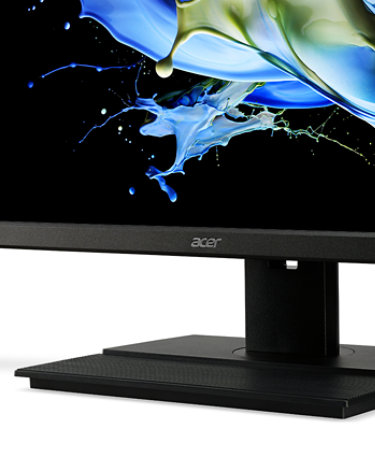
Say goodbye to stuttering and tearing with AMD® Radeon™ FreeSync1 a rapid 144Hz refresh rate2. Video editing and presentation is quicker, easier and smoother as the monitor’s refresh rate is synched to your computer’s framerate.

ZeroFrame Design2
With a 27” or 23.6” FHD display, you’ll want to see as much of it as possible. Get more monitor real estate with the near bezel-less design2, allowing you to see more and do more. The ZeroFrame design lets you place multiple monitors next to each other for a seamless, almost uninterrupted view.

An Ergonomic Edge
Easily tilt, pivot, swivel and make height adjustments at a moment’s notice courtesy of a firm, stainless steel base. Adjust the ErgoStand™ up to 150mm to place the monitor at the optimum height. The ErgoStand also allows you to effortlessly rotate the screen to portrait mode.

A Powerful Touch
Save time by turning on your monitor and PC with a single touch of the monitor’s power button. Save space, as this handy function means you can tuck your PC out of sight and out of your way. This innovative solution supports on board DP and HDMI interfaces and Windows 10 Pro3.

A Wide Range of Colors
Fine-tune your display’s colors for improved accuracy with six-axis color adjustment, while Acer Super Sharpness2 technology fixes details and optimizes image quality.

Eye Safety First
Protect your eyes from unnecessary strain by utilizing Acer BlueLightShield™ and Flickerless™ technologies. View your monitor for longer with reduced glare and eye fatigue thanks to Acer ComfyView™ and Low Dimming™.

Adjustments On The Fly
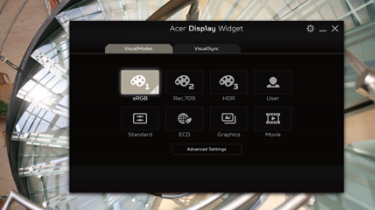
No need to fiddle with buttons. Easily modify your monitor settings via the Display Widget utility software. Customize your viewing by selecting different modes for different apps.
ค้นหาจอภาพ Acer ที่ใช่สำหรับคุณ
ค้นหาและเปรียบเทียบผลิตภัณฑ์ตามคุณสมบัติและรายละเอียดเพื่อค้นหาจอภาพ Acer ที่ดีที่สุดของคุณ
1 For Radeon™ FreeSync technology, users will require: a monitor compatible with DisplayPort Adaptive-Sync, a compatible Radeon™ GPU with a DisplayPort connection, and a compatible Radeon™ Software graphics driver.
2 Specifications may vary depending on model and/or region.
3 Feature support is limited to Acer monitors and may vary between models. Optional DSUB, DP, HDMI can also support Power on by Monitor when selected as configuration.
Sale subject to Limited Warranty and Terms & Conditions agreement. All offers subject to change without notice or obligation and may not be available at all retail locations. Prices listed are manufacturer suggested retail prices and may vary by retail location. Applicable taxes extra. Not responsible for pricing or other typographical errors.